
Looking for an MOH Kuwait online appointment? Ministry of Health appointments can be made online without visiting a healthcare institution. The appointment can be booked via the MOH Kuwait website or the MOH Kuwait appointment platform, depending on the type of service you require.
This step-by-step guide to reserving an MOH Kuwait appointment online will cover everything you need to know, including using the MOH website, selecting your health service, picking your date and time for the appointment, and saving your appointment details on the MOH website as well as the Meta website.
What Is an MOH Kuwait Online Appointment?
An appointment set up online by MOH Kuwait or through the Government’s centralized appointment system.
The use of online appointment booking is to enable citizens/residents to book an eligible health visit prior to attendance at the appropriate facility.
Book Through the MOH Website
The first place to check is the website of the Ministry of Health, Kuwait, where questions are resolved with regard to the Ministry of Health services directly through the use of the digital system.
Step 1: Visit the MOH Kuwait Website
Open the official ” Kuwait Ministry of Health” website.

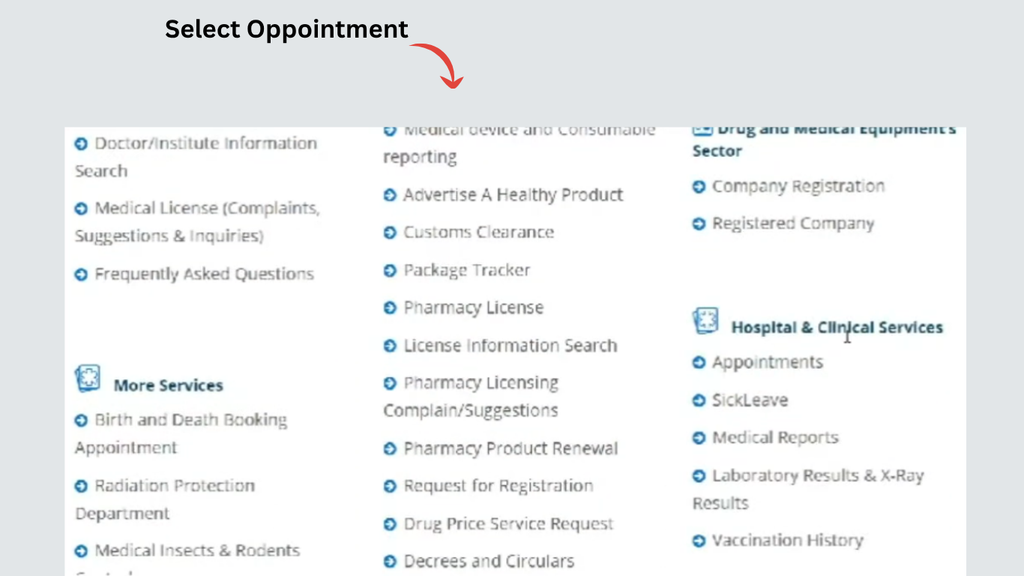
Step 2: Find the Relevant Appointment Service
Visit the section for appointments, hospitals, clinics, and/or healthcare service you need.
Step 3: Enter Your Personal Information
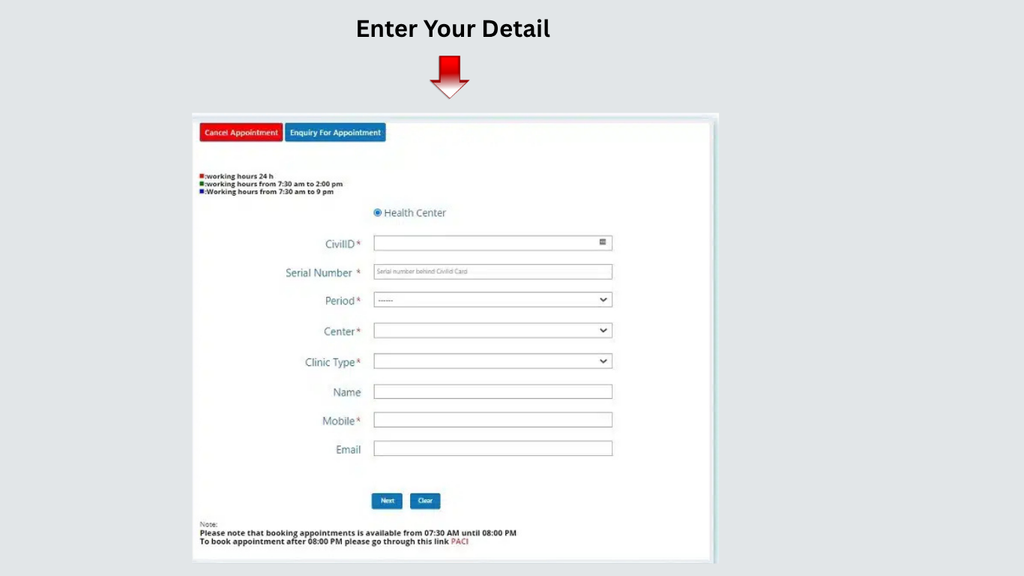
After clicking on the corresponding appointment service, enter all the information asked for by the system.
You might be required to provide details about:
- Civil ID details
- Civil ID serial information
- Name
- Mobile number
- Email address
- Healthcare centre
- Clinic or service
- Preferred appointment period
Don’t put anything in the official government system.
Step 4: Select the Date And Time
Select your Health Centre, Date & Time of your appointment.
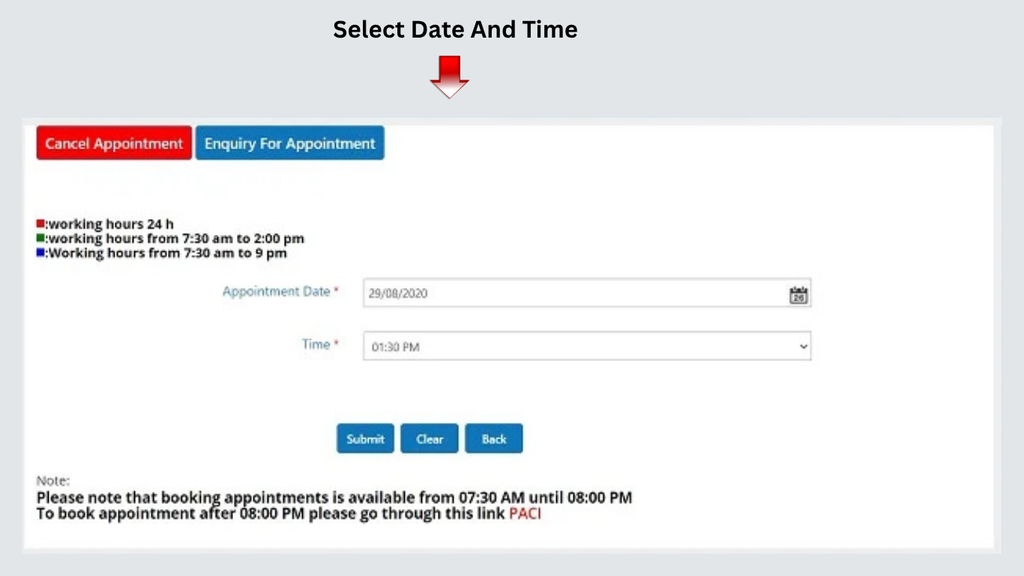
If the system gives you several choices, select the facility that is appropriate for the service you require.
Step 5: Confirm the Appointment
Once everything is correct, submit the appointment request.
If it is successful, the system should supply the necessary information for the appropriate appointment/confirmation.
Step 6: Save Your Appointment Confirmation
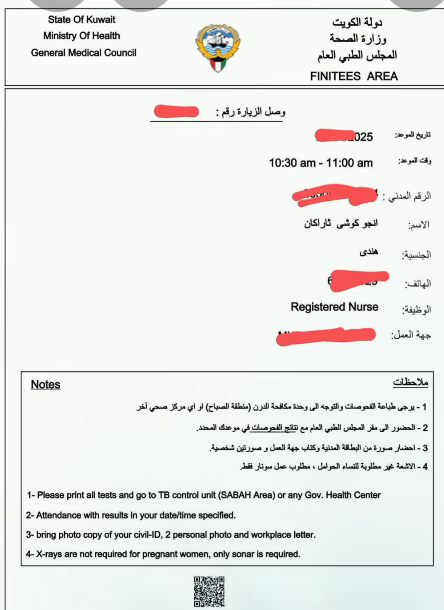
Save appointment details on your phone, e.g., take a screenshot.
The following information will be helpful to have on hand:
- Appointment date
- Appointment time
- Healthcare facility
- Clinic/service
- Reference or confirmation information
With all of this information in hand, it is easier to double-check to make sure that you are booked the right tickets prior to travelling.
Book Appointment Through the Meta Website
The centralised appointment system on Meta Kuwait is for eligible government services (Meta Kuwait website)
Step 1: Open the Meta Kuwait Website
Enter the official platform for government-made appointments on Meta in Kuwait.

Step 2: Log In to Your Meta Account
Type in your Meta account login details and log in.
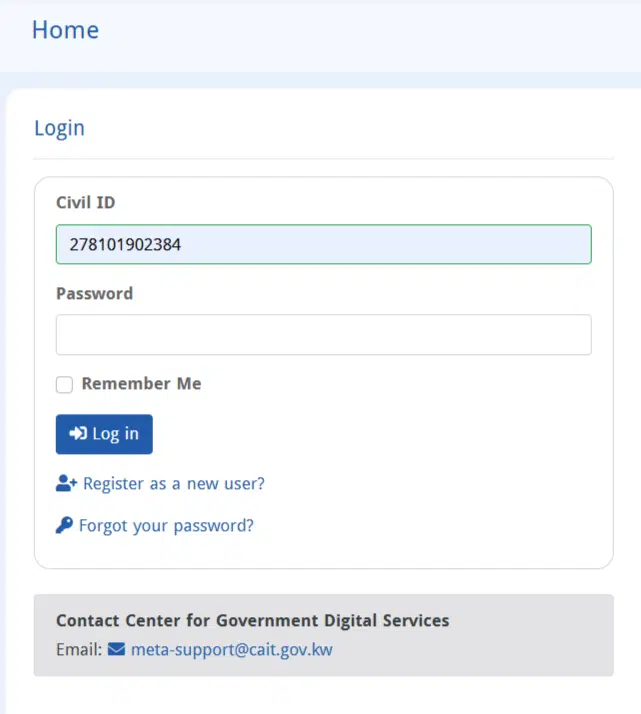
Please ensure that the details in the account are correct before attempting to make an appointment.
Step 3: Open the Appointment Search Section
Once you log in, navigate to the Appointments search tab on your Meta dashboard.
You can search this section for anything offered by the government and/or what they have to offer for appointments.
Step 4: Select the Ministry of Health
Browse through the government departments available and pick Ministry of Health.
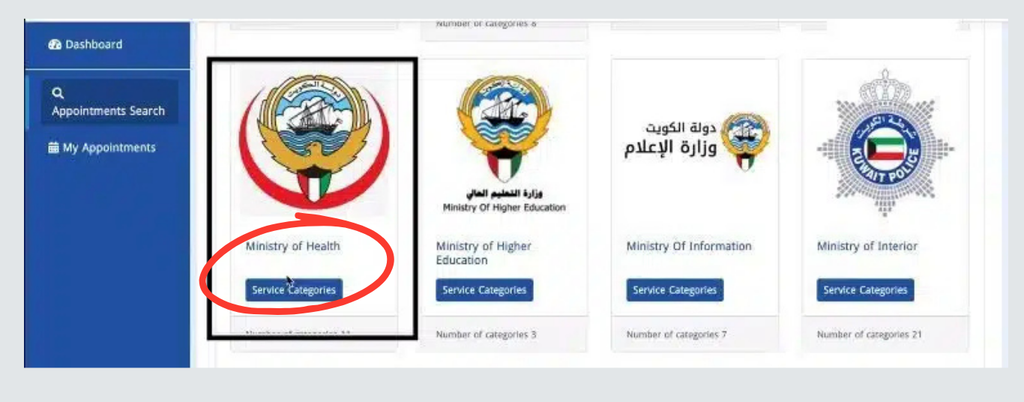
Selecting the correct government entity is important because Meta provides appointments for different government departments.
Step 5: Choose the Location or Healthcare Centre
Once you have chosen the Ministry of Health, scroll and view the departments or service categories listed below.

Step 6: Select an Available Date And Time
When it’s available, the selected service and location will appear, showing available appointment dates on the Meta screen.

Choose a date that suits your schedule.
Step 7: Confirm Your Appointment
Review the complete appointment information and confirm the booking.
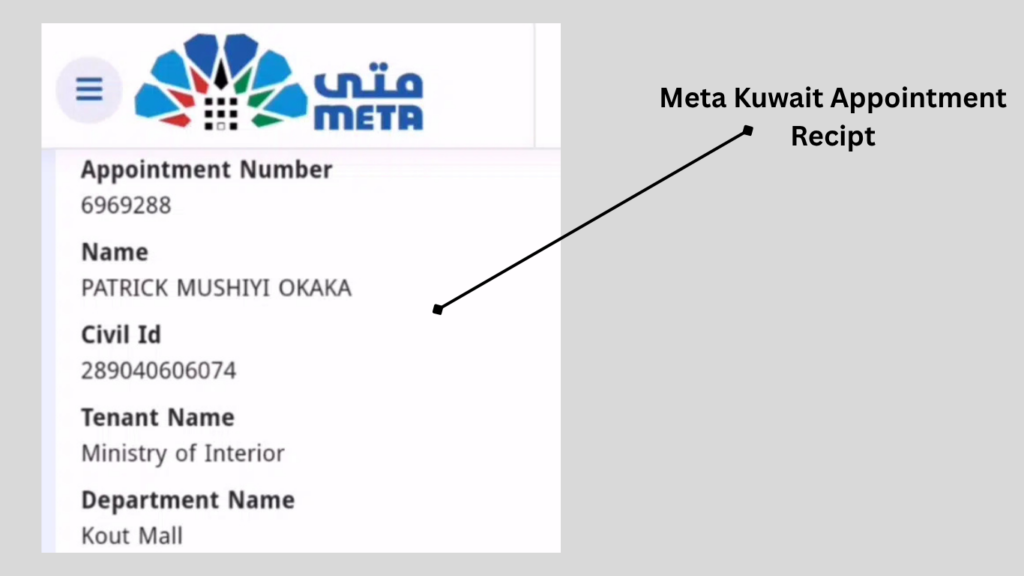
Once the appointment has been successfully booked, save the confirmation details.
MOH Website or Meta: Which One Should You Use?
This is one of the most common questions users have.
The answer is:
Make use of the platform on which the services from the local Ministry of Health are provided.
Use the MOH Kuwait Website When
When seeking a health care appointment or a service from the Ministry’s online health care services, check the MOH website.
This may involve providing services at hospitals and specialized clinics (as per the current structure of online services).
Use Meta Kuwait When
If the government appointment you need appears on the centralised Meta appointment platform, then check Meta.
The general process is:
Log in → Appointment Search → Ministry of Health → Department → Service → Location → Date → Time → Confirm
Government services may change from time to time, so please use the latest options available on the platform.
How to Change an MOH Kuwait Appointment
To book via Meta, log into your account, go into the appointment you currently have, and start the booking.

Steps to Check for a Rescheduling Option
- Log in to your Meta account.
- Open your existing appointments.
- Select the relevant MOH appointment.
- Open the appointment details.
- Find another opportunity to change and/or reschedule.
- Select another available date or time if the system allows it.
- Confirm the updated appointment.
If none of the modification options are shown, the specific service does not provide the capability of changing online via Meta.
How to Cancel an MOH Kuwait Appointment
If you no longer require the appointment, find out if they have a booking system that will offer a cancellation option.
Typically, when you book a Meta appointment, the first step is to open your current appointment.
Steps to Check for Cancellation
- Sign in to Meta.
- Open your appointment list.
- Select the MOH appointment.
- Review the available management options.
- Select cancellation if the option is provided.
- Confirm the cancellation.
If an MOH service has been contacted to schedule an appointment, please refer to the instructions for the cancellation process for each service.
What If No MOH Kuwait Appointment Is Available?
Finding no available appointment can be frustrating, especially when you need the service urgently.
But don’t be mistaken – a blank agenda doesn’t necessarily mean the service has ceased transmissions completely.
Try these steps:
Check Another Date
Check out more dates that the system displays. The availability is subject to variability from day to day.
Check Another Eligible Location
If there is an option for health screening centres, verify if there’s a Concur appointment at another health screening centre.
Confirm the Service
Be aware that you have chosen the right type of appointment. Special Considerations: There may be some varying schedules between the various MOH services.
Check the Correct Platform
If you don’t see the service offered by Meta, see if it is offered on the MOH website directly.
Similarly, if you’re searching for a government job that is administered via Meta, look in your Meta account.
What Information Do You Need for an MOH Kuwait Appointment?
Information required will depend upon the particular Ministry of Health service required.
You may need:
- Kuwait Civil ID
- Civil ID-related information
- Mobile number
- Email address
- Healthcare centre details
- Clinic or service information
- Preferred appointment date or period
You will be notified on the internet form as to what is required.
Give the official service the information for which it was requested.
Common MOH Kuwait Online Appointment Problems
I Cannot Log In
The first thing to do is to confirm that you are utilizing the right account information and authentication stage.
In case the issue persists, use the account recovery or support options offered by the site.
My Appointment Is Not Showing
Check whether you are logged into the correct account and whether the booking was completed successfully.
Look for a confirmation message or reference number.
There Are No Available Dates
If you can choose an alternate eligible centre, try another date or a new one.
Please check again later as appointments can be booked.
I Selected the Wrong Centre
Look at what options your booking site offers for modifications and/or cancellation. Do not, however, follow the instructions of the service concerned.
I Cannot Change My Appointment
Online rescheduling isn’t always available. Please verify appointment details for options and directions for modification if it is not available.
Frequently Asked Questions (FAQs)
How do I book an MOH Kuwait online appointment?
Select the type of MOH service, the booking method, then the location, date, and time, then confirm.
Is it possible to schedule an appointment with MOH in Kuwait online?
Yes. MOH services that are eligible can be booked online via the relevant MOH or Meta appointment system.
Is it possible to book an appointment at MOH Kuwait?
Yes. Depending on the need for the services, eligible residents may schedule appointments with the appropriate MOH.
What is the best platform to use for the MOH website or Meta?
Please use the MOH website for appointments arranged directly with the MOH. Use Meta if an MOH appointment is available on the Meta platform.
Read Also: Civil ID Home Delivery Kuwait: Apply & Track (2026)
Final Words
An MOH Kuwait online appointment is a convenient way to schedule a legitimate Ministry of Health appointment ahead of heading to a healthcare establishment. Clarifying criteria include picking the right service and the proper booking platform.
For in-house appointments, please go to the MOH Kuwait website. Once signed in to the Meta Kuwait website, users are provided with a list of government services; by selecting the Ministry of Health, the user will be presented with a selection of services and locations to choose from, and will be able to contact them for a booking if one is available.