Looking to get an appointment at PACI in Kuwait? Based on the kind of appointment service, you’re looking for, accessible via the Meta Kuwait website or Sahel mobile app. Both database platforms enable individuals to get government appointment services without going to an office only simply to create an appointment. In Kuwait, the Public Authority for Civil Information (PACI) is responsible for providing crucial civil information services, including civil IDs.
This guide will help you book a PACI appointment step by step and see the booking details, as well as rescheduling or cancelling an appointment, either using Meta Kuwait or Sahel.
Book a PACI Appointment Through the Meta Kuwait Website
Use the steps below to find and make your needed PACI appointments.
Step 1: Open the Meta Kuwait Appointment Portal
Visit the official Meta Kuwait website:
The portal provides access to government appointment services.

Make sure the website address is correct before entering your Civil ID information or account password. Avoid using unofficial websites that imitate the government portal.
Step 2: Log In to Your Meta Kuwait Account
When the login page opens, enter your registered Civil ID number and password in the appropriate fields.

If you are a new user, you will need to complete the registration process before accessing the appointment services.
Step 3: Open Appointment Search
Check the search or book an appointment option. It might be listed as Appointments, Appointment Search, or something like that, depending upon which portal interface you have.

Select the option to search for a new appointment.
Step 4: Select the Public Authority for Civil Information (PACI)
The next step is to select the government department you want to visit.
Search for:
- The Public Authority for Civil Information
Select PACI from the list of available government entities.
Step 5: Choose a PACI Branch
After you choose the service, one of the subjects listed below is available as a PACI location:

Choose the branch that offers your required service and is convenient for your visit.
Step 6: Select Your Appointment Type and Time
The Meta portal may display appointment types or scheduling options, such as morning and evening sessions, depending on the service.

- Pick from an available choice that is right for your time.
- Then check the calendar and appointments that are available.
- Select a date and time that you are available to attend.
Use one of the other dates displayed, instead of repeatedly making a selection for a full calendar date.
Step 7: Submit and Confirm Your PACI Appointment
Check the information on the screen before making your booking.
Check:
- Your selected government authority.
- The PACI service category.
- The specific service.
- The selected branch.
- The appointment date.
- The appointment time.
If all is correct, click on the “submit” or “confirm” button shown on the portal.
Step 8: Check Your Appointment Details
After a successful booking, open the My Appointments section of your Meta account, if available.

2. Through the Sahel App
Step 1: Download and Open the Official Sahel App
To do this, provide the required Sahel application for your smartphone.
It’s available in the following app stores:
Step 2: Log In to Your Sahel Account
Log in via the accepted sign-in process.
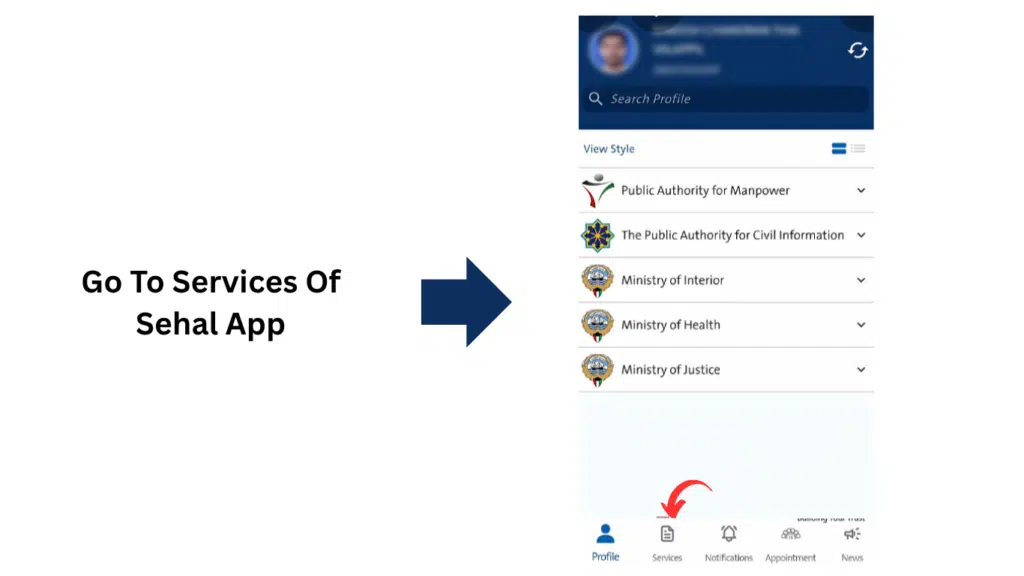
Step 3: Open Appointment Booking
On the Sahel dashboard, click Appointment Booking.
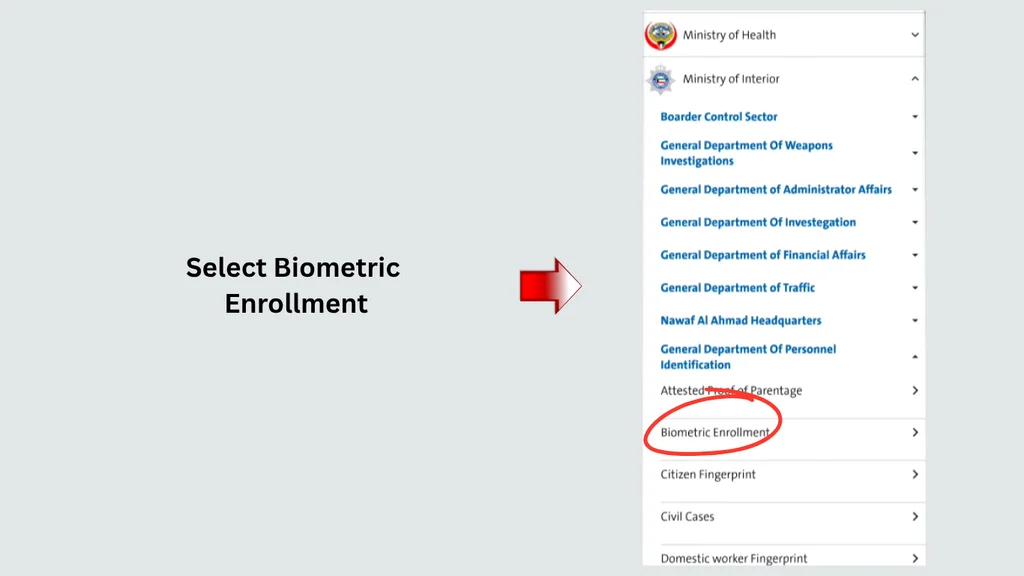
Step 4: Select Your PACI Service
Once you select PACI, check out the kinds of services available.
Select the appropriate service for the reason for your visit.
Step 5: Select Your Preferred PACI Branch
If selecting a branch is an option, view the location the app is displaying.
The selection should be towards the place in which you need your service.
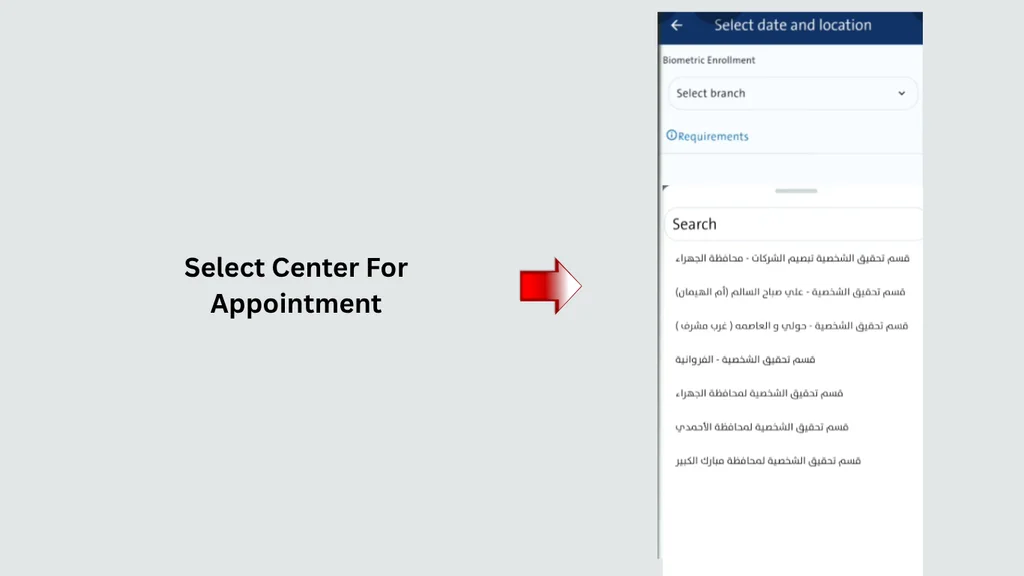
Check the branch name carefully before continuing, especially if multiple PACI facilities are displayed.
Step 6: Choose an Available Date and Time
After selecting the branch, check the available appointment schedule. Choose an available date and time that suits you.
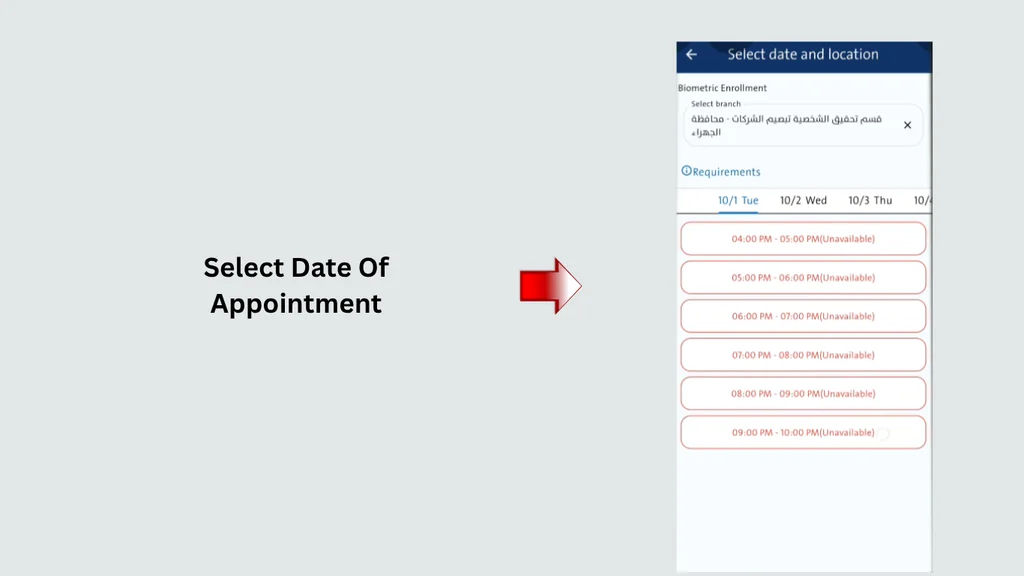
Step 7: Confirm Your Booking Through Sahel
Look at the instructions for confirmation in the application to follow them. Once you’ve submitted the appointment request, you’ll need to wait for the system to confirm your booked appointment.
What Information Should You Prepare Before Booking a PACI Appointment?
Gathering and having the required details before the booking process begins can help you in choosing the right service and not making any mistakes along the way.
| Information | Why it is useful |
|---|---|
| Civil ID number | Account access and identity-related services |
| Meta or Sahel login details | Accessing the booking platform |
| Contact information | Account verification and notifications |
| Required PACI service | Selecting the correct appointment category |
| Preferred branch | Choosing a convenient service location |
| Available dates | Selecting a suitable appointment |
| Supporting information | Understanding the requirements of your transaction |
Which PACI Services May Require an Appointment?
Not all PACI transactions need an appointment; there are many in which an appointment isn’t needed.
Some examples of PACI-related transactions include:
1. Civil ID Address Change
If you have moved to a different residence in Kuwait, you can update your registered residential address in the civil-related records.
Verify the requirements for any address changes that apply to your applicant category prior to booking.
2. First-Time Civil ID Registration
Civil ID registration procedures need to be completed by new residential members and other eligible applicants.
Required documents and process vary according to the status and situation of the applicant. In some instances, it may be necessary to attend a PACI office.
3. Civil ID Replacement
Consult the PACI instructions to see if the specific case can be dealt with Online or by appointment if your Civil ID has been lost, damaged, or needs to be replaced.
This could vary depending on the reason for replacement.
4. Personal Information and Record Updates
Some civil information changes may need to be accompanied by documents or verification of identity.
Be sure to review the category of the service you are requesting from the specific PACI prior to booking an appointment to ensure that you choose the appropriate service.
Which PACI Services May Require an Appointment?
An appointment is not necessary for all PACI transactions. The requirement will vary depending on the service, applicant’s situation, and procedure used.
Examples of transactions involving PACI are:
1. Civil ID Address Change
All of this may need to be supported with paperwork and an appointment date for face-to-face verification; this will depend on various circumstances.
Check any address change requirements that may apply to your type of applicant prior to booking.
2. First-Time Civil ID Registration
Civil ID registration procedures may need to be completed by residents who are new or by other possibly eligible applicants.
This will also rely on the status and conditions of the applicants and will require the submission of the required documents involved in the process.
3. Civil ID Replacement
If your Civil ID gets lost, damaged, or you need a replacement, you can follow the official PACI instructions to see if your specific case can be taken care of online or in person.
This varies, depending on the purpose of replacement.
4. Personal Information and Record Updates
Certain changes to civil information may require supporting documents or identity verification.
Check the relevant PACI service category before booking so that you select the correct appointment.
Documents Required
The following documents and information may be relevant in certain cases:
| Document or information | Possible purpose |
|---|---|
| Original Civil ID | Identity verification |
| Passport | Identity and registration details |
| Appointment confirmation | Verification of your scheduled visit |
| Rental agreement | Supporting evidence for certain address changes |
| Electricity or utility bill | Address verification, where accepted |
| Landlord or leaseholder documents | Certain residential address applications |
| Additional supporting documents | Depending on the application |
How to Check Your PACI Appointment Status
Once you have booked an appointment for PACI, verify that appointment.
The method will depend on the platform you used.
Check Your Appointment Through Meta Kuwait
- Visit Meta Kuwait.
- Log in using your registered account.
- Open the Appointments or My Appointments section.
- Find your PACI booking.
- Check on the date, time, branch and the service checked.
If it is still not on the book, ensure that you went through the final booking confirmation.
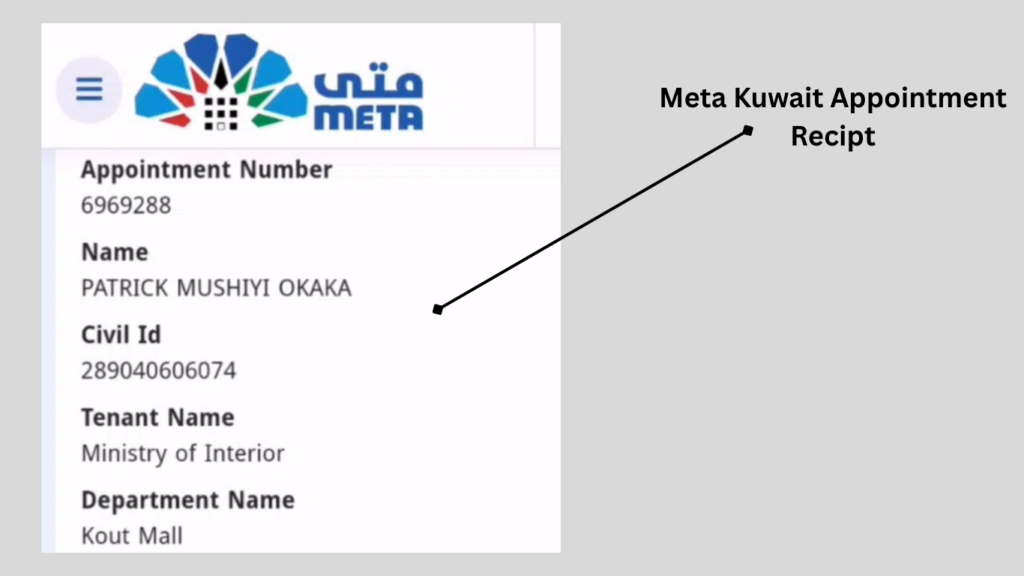
Check Your Appointment Through Sahel
- Open the Sahel application.
- Sign in using your registered account.
- Navigate to Appointment Booking or the relevant appointment section.
- Look for your existing PACI booking.
- Open the appointment details, if available.
You should also review any notifications received through the application.
How to Reschedule or Cancel a PACI Appointment
How to Reschedule a PACI Appointment
To change your appointment date or time:
- Open Meta Kuwait or Sahel, depending on where you booked.
- Log in to your account.
- Navigate to the appointment management section.
- Locate your existing PACI booking.
- Check whether the system provides a modification or rescheduling option.
- Select another available slot, if permitted.
- Review and confirm the updated booking.
How to Cancel a PACI Appointment
If you no longer require your appointment, see if there is a cancellation option.
Do the following general steps:
- Log in to the platform used for booking.
- Open your existing appointments.
- Select the PACI appointment you want to cancel.
- Review the booking details.
- Follow the displayed cancellation instructions.
- Check that the appointment status has been updated.
Please do not assume that an appointment has been cancelled until they have been updated by the system.
PACI Timing Today
The breakdown of office hours on a day-to-day basis as well as every week is listed below.
South Surra (Headquarters)
Timing
| Day | Office Hours |
|---|---|
| Tuesday | 8 am–1 pm, 3–7 pm |
| Wednesday | 8 am–1 pm, 3–7 pm |
| Thursday | 8 am–1 pm, 3–7 pm |
| Friday | 8 am–1 pm, 3–7 pm |
| Saturday | 8 am–1 pm, 3–7 pm |
| Sunday | 8 am–1 pm, 3–7 pm |
| Monday | 8 am–1 pm, 3–7 pm |
South Sabahiya Branch
Timing
| Day | Office Hours |
|---|---|
| Tuesday | 8 am–1 pm, 3–7 pm |
| Wednesday | 8 am–1 pm, 3–7 pm |
| Thursday | 8 am–1 pm, 3–7 pm |
| Friday | Closed |
| Saturday | Closed |
| Sunday | 8 am–1 pm, 3–7 pm |
| Monday | 8 am–1 pm, 3–7 pm |
Jahra Timing
Timing
| Day | Office Hours |
|---|---|
| Tuesday | 8 am–1 pm, 3–7 pm |
| Wednesday | 8 am–1 pm, 3–7 pm |
| Thursday | 8 am–1 pm, 3–7 pm |
| Friday | Closed |
| Saturday | Closed |
| Sunday | 8 am–1 pm, 3–7 pm |
| Monday | 8 am–1 pm, 3–7 pm |
What to Do If No PACI Appointments Are Available?
Occasionally services run full for appointments, especially for the more popular services.
1. Check Both Booking Platforms
Check whether the required service is available in Sahel; if you don’t find it there, then check in Meta Kuwait.
2. Review Other Available PACI Branches
If the booking system displays a list, see if another qualifying branch has an appointment.
Ensure that the alternative branch offers the same particular service you are looking for.
3. Check the Appointment Calendar Again
The availability of appointments may change as new appointments are scheduled or old appointments are cancelled.
No need to believe the unverifiable comments that PACI uneventfully publishes all appointments at a specific time of day.
4. Check Whether You Selected the Correct Service
If the wrong service type is chosen, it may not help you identify the appropriate appointment.
Once back on the PACI service list, you should be sure the category you have selected matches your transaction.
Frequently Asked Questions (FAQs)
1. How can I book a PACI appointment in Kuwait?
PACI’s appointment services are offered via the PACI website or PACI app.
2. What is the official website for PACI appointment booking?
The official Meta Kuwait appointment portal is https://meta.e.gov.kw/.
3. Can I book a PACI appointment through the Sahel app?
Yes. Sahel provides opportunities for you to get access to available PACI appointment services. Log in to your account, click on Appointment Booking, and choose Public Authority for Civil Information.
4. Is Meta Kuwait the same as Sahel?
Sahel is not a government appointment app; it provides government services.
Read More: Marriage certificate in Kuwait: Get it Now
Final Words
For those looking to book an appointment with PACI in Kuwait, the initial step is to pick the right platform from the government and identify the services that you’re seeking. Schedule appointments on Meta Kuwait’s website on your computer or access available government services on your phone with Sahel.
Date and time must be checked prior to confirmation of appointments and the branch. Review the sale/purchase document requirements.