Have you ever wondered how you can pay your mobile bill (Zain Kuwait) in seconds, without going to a store? The problem many users face is that they want to easily and efficiently top up their balance or clear their postpaid bills without having to go through long queues or complex procedures to access their accounts.

This is where Zain Quick Pay Kuwait comes in, and it comes in big. Through the online Quick Pay service that Zain Kuwait presents, customers can pay their bills or recharge prepaid numbers simply by having a mobile number and a safe system for paying money.
This guide will teach you two easy ways of utilizing Zain Quick Pay Kuwait:
- Through the Zain Website
- Through the Zain Mobile App
The steps of each approach are described one by one to make the users understand how to follow them and make a payment without inconvenience.
What is Zain Quick Pay Kuwait?
Zain Quick Pay Kuwait is an online service that is provided by Zain Kuwait, and it will enable you to:
- Pay the mobile/internet bill immediately.
- Do not log in to your account.
- Full transactions at the touch of a few buttons.
It is fast, convenient, and easy to use- it is ideal for a user who prefers a hassle-free and quick payment process.
How to Use Zain Quick Pay Kuwait
Now I would like to show you what the two best ways to use Zain Quick Pay are.
Method 1: Pay Using the Zain Website
This is direct and most popular.
Step 1: Visit the Official Zain Website
Visit the official site of Zain Kuwait and find Quick Pay on the homepage.
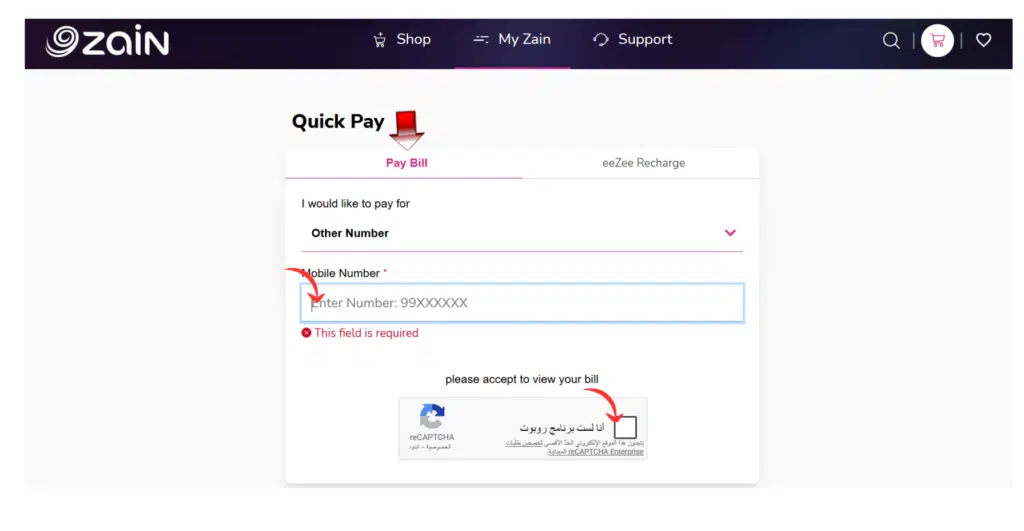
Step 2: Enter Your Mobile Number
- Type your Zain number carefully
- Ensure that it is operational and proper.
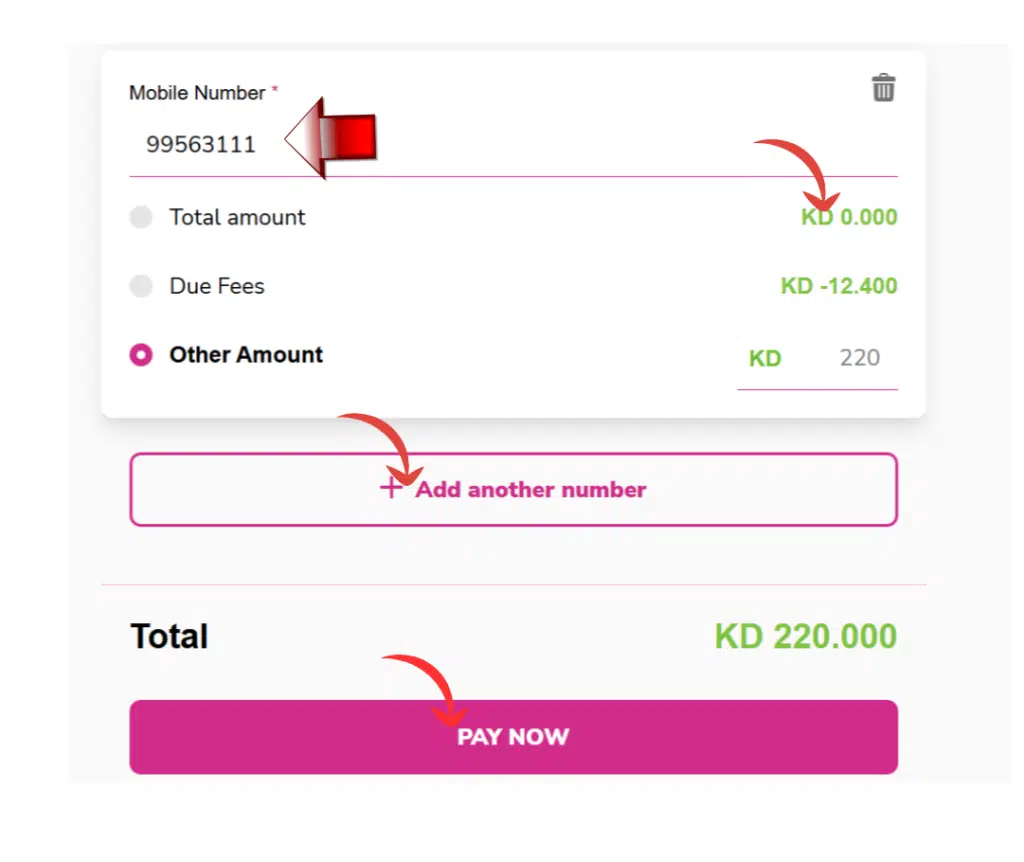
Step 3: View Your Bill Details
- Your outstanding bill will be shown in the system.
- Before going ahead, make sure that the amount is correct.
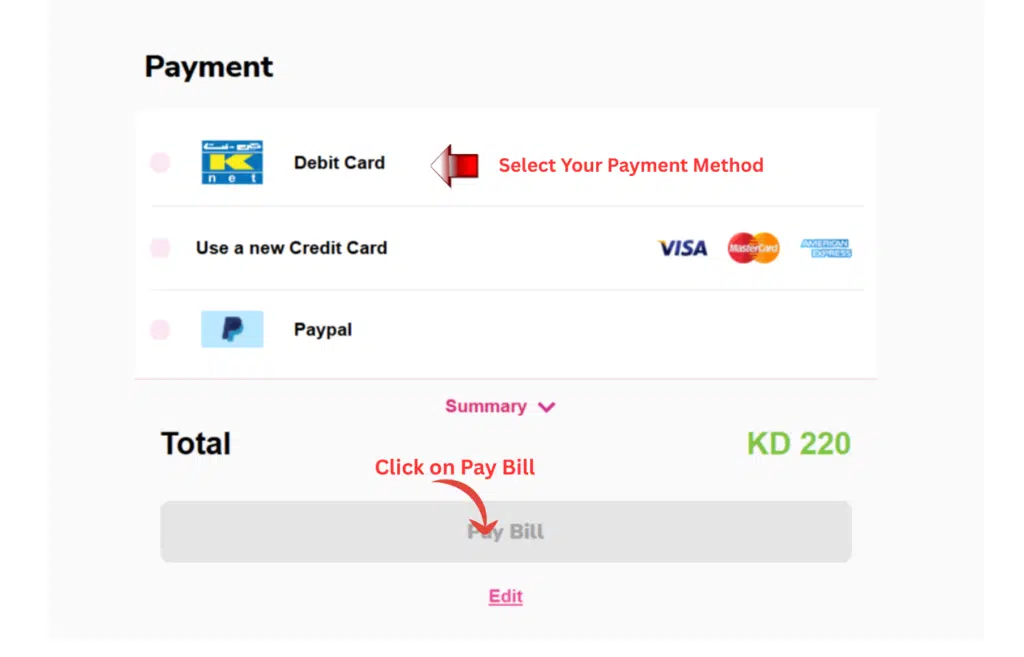
Step 4: Make Payment
- Select your favorite payment method (card, etc.)
- Enter payment details securely
- Confirm the transaction
Step 5: Receive Confirmation
- You will get a confirmation message
- Keep a screenshot or receipt for the record
Read Also: Kuwait Visa Status Check Online (MOI, App & eVisa)
Method 2: Pay Using the Zain App
In case you like convenience on the mobile, it is a less painstaking way to go.
Step 1: Download or Open the App
Sign up for the Zain KW App on your application store.

Step 2: Login or Continue
- You can log in for full access
- Or use fast payment methods (where possible)
Step 3: Select “Pay Bill” Option
Go to the billing section and press Pay Bill.
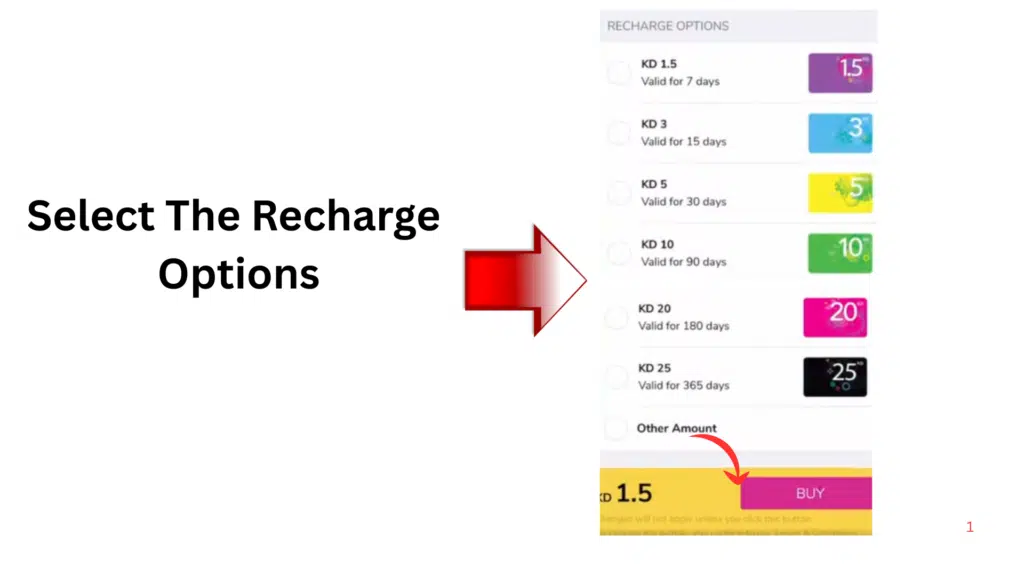
Step 4: Check Your Billing Information
- Review your due amount
- Confirm the correct number
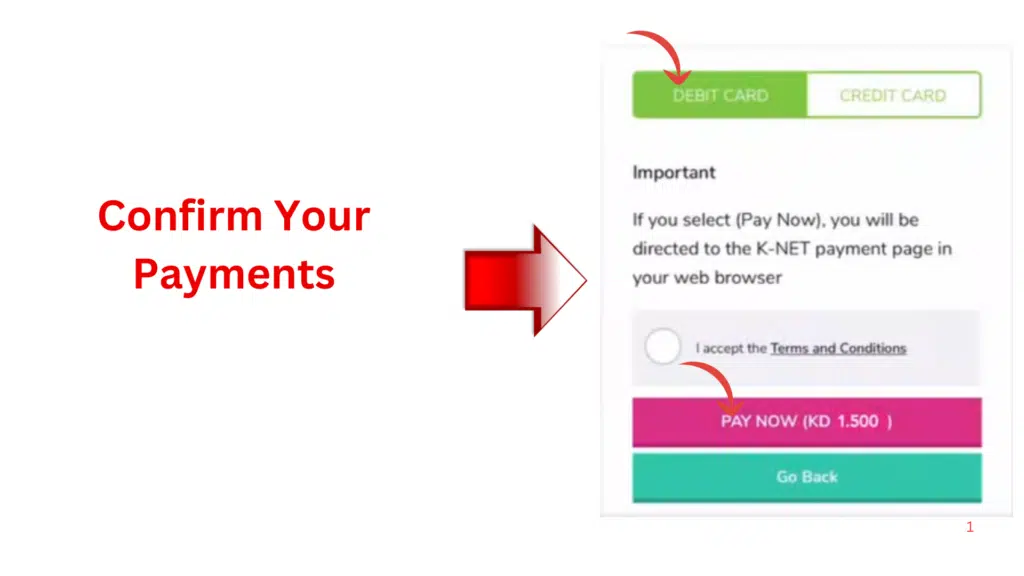
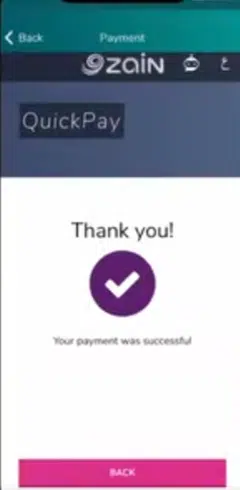
Step 5: Complete Payment
- Choose your payment method
- Authenticate and close the deal.
Common Problems and Solutions
In case of online payment, some users can have some problems. Being able to solve these issues will save time.
Payment Failed
In case of failure of the payment, attempt the following:
- Check your internet connection
- Confirm card details
- Make sure that there is adequate balance in your card.
Payment Not Reflected
Sometimes the payments might require a couple of minutes to be reflected.
If the issue continues:
- Wait a short time
- Refresh your account balance
- Contact customer support
Wrong Mobile Number Entered
In case of a mistake of typing in the wrong number, call the Zain customer service promptly to seek help.
Tips for Safe Online Bill Payments
When paying online, one needs to observe simple security measures.
- It should be the official Zain site or application.
- Do not use social or open networks to make payments.
- Check your mobile number twice, then pay.
- Retain receipt of payment.
These measures can be used to make sure that your transaction is safe and secure.
Why Zain Quick Pay Kuwait Is Popular
Zain Quick Pay Kuwait is easy to use, which explains its popularity. The customers do not have to pass through complex processes as far as managing their mobile payments goes.
Rather than going to the physical stores, the user can make payments in a matter of seconds through either:
- The official website
- The Zain mobile application
This has been a convenience that has seen the service become one of the most desired when it comes to making mobile payments of bills in Kuwait.
Frequently Asked Questions (FAQs)
1. What is Zain Quick Pay Kuwait?
Zain Quick Pay Kuwait is a web-based service offered by Zain Kuwait that enables users to pay their mobile or internet bills without logging into any account, and is an online payment system.
2. What do I do when I need to pay the Zain bill, and I am not logged in?
To use Zain Quick Pay, you have to visit the official site, fill in your mobile number, view your bill, and make the payment by following a few simple steps.
3. Is Zain Quick Pay safe to use?
Yes, Zain Quick Pay is also safe, and it encrypts your personal and financial information with trusted payment gateways to secure the information.
4. Is Zain Quick Pay mobile-enabled?
No doubt, you will be able to use Zain Quick Pay with your mobile browser or Zain KW App to get a more convenient and easier experience.
5. What will I do in case of failure of my payment?
In case your payment does not work, check your card information, make sure that you have enough money, and re-attempt. You can also switch to another payment method or retry after some time.
Read Also: Check STC Balance Without Internet in Kuwait
Final Words
Zain Quick Pay Kuwait has made it easy to manage mobile payments. Users can make their bills, recharge prepaid numbers, or manage telecom services anywhere through a few steps.
Both the site approach and the mobile app approach will be a quick, safe, and efficient method of dealing with payments.