
Want to check your STC balance instantly?

As a prepaid or a postpaid customer in Kuwait, it is imperative to have awareness of your balance to prevent cases of disruption in services, as well as to control your consumption. STC has some convenient methods to check your balance, where you can use the online platform, USSD code, 556#, SMS, and MySTC App.
In this complete guide, I will show you step-by-step procedures for verifying the balance, fixing the most frequent problems, and give you some tips to make the process fast.
About STC Kuwait
STC Kuwait is a telecommunications company that is among the most successful telecom companies in Kuwait, and it provides prepaid and postpaid mobile services, internet services, and digital services. STC has various quick and easy methods of checking your balance to ensure that users are never left out.
STC Balance Check via Official Website
1. Visit the Official STC Kuwait Website
Launch your browser and visit the official site of the STC Kuwait.

2. Click on Login or Account Section
Go to the account or login section to check your account.

3. Verify with OTP
Do the verification by typing in the OTP received in your registered mobile phone.
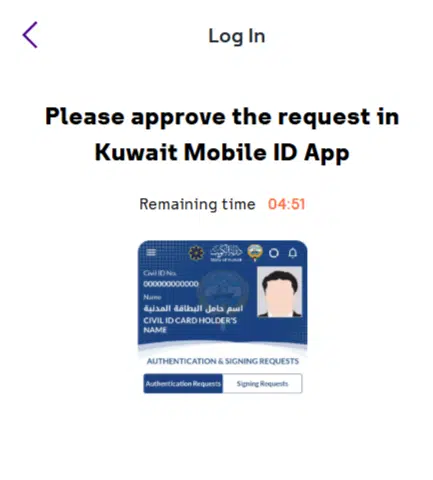
4. Go to Service
When all the verifications are done, you will be taken to the dashboard.

5. Go to Quick Pay
Enter Civil Id and click on proceed.
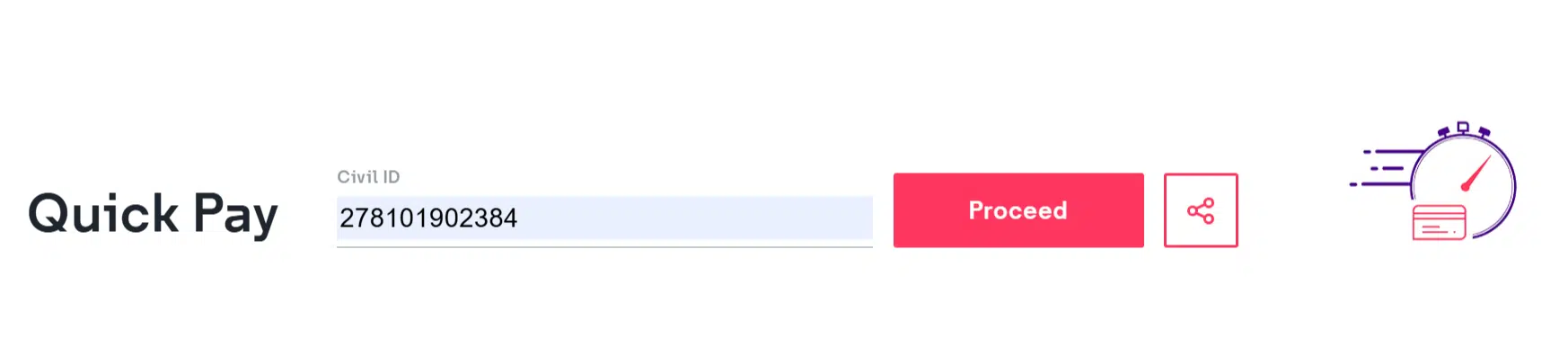
6. View Your Balance
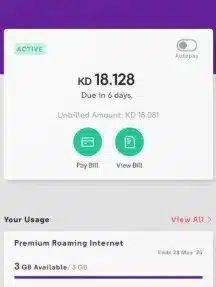
The dashboard will show you your present balance so that you can easily refer to it.
Why Use the Website Method?
- Secure and official
- Gives a detailed account summary.
- Tracks data usage and balance
- View bill history with postpaid members.
- Package and convenient recharge.
Using USSD Code ★556#
The most popular and fastest method to check your balance is the USSD method.
How to Use USSD Code
- Open your phone’s dial pad.
- Dial ★556#
- Press call.
- Wait a few seconds.
- Your remaining balance will appear on the screen.
Benefits of USSD Method
- No internet required
- Works on all phones
- Instant result
- Free of cost
- Available 24/7
This is the most appropriate with the users with low-end phones which do not have internet connectivity.

Read Also: Kuwait Civil ID Address Change: Documents, Fees & Time
STC Balance Check via SMS
SMS approach is ideal to use when the user would like to have written confirmation.
Steps to Check Balance by SMS
- Open your messaging app.
- Type balance.
- Send it to 888888.
- Wait for the reply SMS.
- Your balance details will be displayed.
Why Choose the SMS Method?
- Easy to use
- Written confirmation
- No internet required
- Works on all devices

STC Balance Check via MySTC App
The official app provides a complete digital solution.
Steps to Check Balance in MySTC App

- Download the MySTC App from Play Store or App Store.
- Install and open the app.
- Log in using your mobile number.
- Verify with OTP.
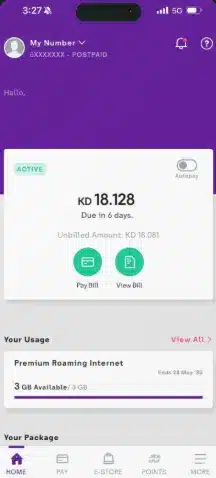
- Your dashboard will show:
- Remaining balance
- Data usage
- Package details
- Expiry date
Why the App is Recommended
- Real-time balance updates
- Full usage tracking
- Bill payment options
- Recharge facility
- Package subscription management
- Secure account control
STC Prepaid vs Postpaid Balance Check
It is important to understand the difference between prepaid and postpaid users.
Prepaid Users
You can check the balance via:
- USSD ★556#
- SMS to 888888
- MySTC App
- Official website
The balance shows your remaining credit.
Postpaid Users
You can check:
- Outstanding bill
- Due amount
- Billing cycle
- Pay online via app or website
This is the most appropriate with the users with low-end phones which do not have internet connectivity.
Which Method Is Best?
| Method | Internet Required | Speed | Best For |
|---|---|---|---|
| USSD ★556# | No | Instant | Quick check |
| SMS to 888888 | No | Fast | Written confirmation |
| Website | Yes | Moderate | Full account details |
| MySTC App | Yes | Instant | Complete digital control |
Common Errors & Solutions
Many users complain of having issues with the balance check. Here are solutions:
USSD Code Not Working
Possible Reasons: Network issue, SIM inactive, system updates
Solution: Restart phone, check signal, try later, contact support
No SMS Reply Received
Possible Reasons: Wrong format, poor network, delay
Solution: Check text correct, check the network and wait 1-2 minutes.
App Login Problem
Possible Reasons: Wrong number, OTP delay, outdated app
Solution: Update app, reinstall, check internet, request new OTP
Website Login Issue
Possible Reasons: Wrong credentials, browser issues
Solution: Clear cache, reset password, try a different browser
Frequently Asked Questions (FAQ)
What is the balance check code of STC Kuwait?
The official USSD code is *556#. Check your balance by just dialling.
What is the way to check the STC balance with the help of SMS?
Type balance and send it to 888888. And you will have your balance to be paid.
Is the STC balance check free?
Yes, balance checking through USSD, SMS, site, or an application is normally free.
Is it possible to check the balance in STC without internet?
Yes. Dial ★556# or send SMS to 888888.
What is the way I verify my STC postpaid bill?
You can visit the site or the MySTC app and view the details of your outstanding bills.
Read Also: Civil ID Fine Check in Kuwait: Avoid Travel Ban Now
Final Words
STC balance in Kuwait is easy to check when you are aware of the appropriate ways. You can dial 556#, use SMS to 888888, use the official site, or do everything in the MySTC App, and this guide will not leave any choice behind.
Keep this guide in your pocket, and you will not be revisiting the issue of checking your balance.


