
Do you have difficulties using the META portal in Kuwait? You’re not alone. A large number of residents experience problems with logging in or making their first registration. The portal called META opens the door to your safe online services, notifications, and account administration, but only with the knowledge of the proper steps. Be it a new user wanting to register in the META Portal or a returning user wanting to log in after a long time or simply forget their password, this guide is crafted specifically for the Kuwait users so that they can easily go about it without.

Using this step-by-step tutorial, I will show you how to create an account, log in and change your password in the META portal in Kuwait.
What is the META Portal?
META Portal is the official online environment, which enables users to log in to their META accounts, manage services, and receive updates about notifications. It is created to have a safe, convenient, and user-friendly interface for individuals and businesses in Kuwait.
By using the META Portal, you can:
- Access your account dashboard anytime.
- Manage personal information securely.
- Track requests/track services made via META.
- Get updated on the account activities in time.
How to Register on the META Portal Kuwait
New users must register an account before they log in. Here’s how you can do it easily:
Step 1: Visit the Official META Portal Website
Open your browser and access the official link of the Kuwait META Portal. The URL should be accurate so that one can be sure of avoiding phishing sites.

Step 2: Click on “Register”
On the login page, you will find the registration form. It normally comes at the bottom of the page where the login form is.

Step 3: Fill in Your Details
You’ll need to provide:
- Full name
- Email address
- Mobile number
- National ID or Civil ID

Step 4: Create a Password
It must be a very powerful password and must include letters, figures, and symbols. Authenticate the password in the necessary entry.
Step 5: Verify Your Account
- Your verification code can be sent to you either through SMS or email.

Once completed, your META Portal account is ready to use.
Read Also: Kuwait Travel Ban Check 2026: Confirm Status Before You Fly
Step-by-Step META Portal Login Guide for Kuwait Users
You can log in within a short time and securely using the following steps in the event you already have an account:
Step 1: Open the Official META Portal Website
Visit the official META Portal.
Step 2: Enter Your Login Credentials
- Username/Email: Fill in the email/Username with which you are registered on your account.
- Password: Enter your password carefully.

Step 3: Complete Any Verification
- There are other accounts where OTP verification is done through SMS or email.

Step 4: Access Your Dashboard
Once you land on the site, you will be welcomed by your dashboard, where all your account details, notifications, and your choices to control your account are located.
Forgot Password? How to Reset the META Portal Password
It is normal to lose passwords. This is the way to reset yours:
Step 1: Go to the Login Page
Beneath the login form, one can find a link called Forgot Password.
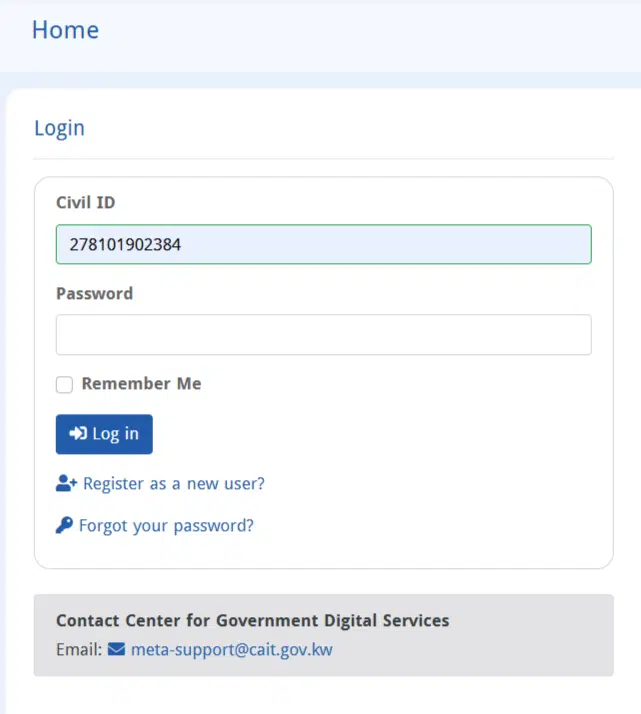
Step 2: Enter Your Registered Email or Username
Give the email or username of your account.

Step 3: Verify Your Identity
- OTP can be sent to you through a message or an email.
- Enter OTP to authenticate yourself.


Step 4: Create a New Password
- Choose a strong password.
- Recheck it by typing it in the necessary field.
Once saved, you may immediately log in with your new password.
Common META Portal Login Issues and Solutions
Even basic processes have problematic aspects. Here’s how to tackle them:
- Incorrect Username or Password
- Ensure the caps lock is off.
- Change the password in case of necessity.
- Account Locked
- Various unsuccessful tries will lock your account.
- Wait 15-30 minutes or call the META helpdesk in Kuwait.
- Browser or Device Issues
- Clear cache and cookies.
- Best results have been obtained with Chrome, Firefox, or Safari.
- OTP Not Received
- Verify mobile numbers or email addresses.
- Resend the OTP if necessary.
Frequently Asked Questions (FAQ)
Was it possible to register on the portal of META without a National ID?
No, registered in Kuwait, one will need a legitimate National ID.
Which are the best browsers to use in the process of targeting the META portal to log in?
The browsers of choice include Chrome, Firefox, Safari, and Edge. Avoid outdated browsers.
What of the instances when OTP is not issued for registration/login?
- Check your network connection.
- Make sure that your phone/ email is accurate.
- Contact META support in case of any problem.
Does the META portal login have any security issues?
Yes, the portal has been encrypted, and two-factor authentication has been used to enhance security.
Read Also: Kuwait Traffic Fines Check Online (MOI Civil ID Guide)
Final WOrds
The procedure to get into the META portal in Kuwait is easy when you are aware of the procedure.
Remember:
- To start with, make an account using your National ID and personal information.
- Enter your credentials and perform security verification.
- You are in need of the password, which you have lost, if you had gone through the reset instructions.
With this guide, any of your META accounts can now be managed easily, safely, and conveniently at any location.