
Do you know if your Civil ID information in Kuwait is correct or not? One of the most significant documents in Kuwait is your Civil ID, which is used in all activities such as banking and healthcare, among others. It is important to make sure that your Civil ID name and details are correct to ensure that there are no problems in official procedures.

Through the assistance of the Kuwait Mobile ID App, we will give a step-by-step illustration of how to check your Civil ID name online in Kuwait.
What is the Kuwait Civil ID?
A Civil ID is an obligatory identification card for people living in Kuwait and its citizens. It is a certificate of identity, nationality, and residence, and multiple official transactions require it.
Importance of Civil ID in Kuwait
- Use as your ID card issued by the government.
- Banking, healthcare, visas, and other services are required.
- Assistance in confirming yourself in any legal deal.
Who Needs a Civil ID?
- Kuwaiti citizens
- Expatriates residing in Kuwait.
- Each and every resident above 18 years is supposed to have one.
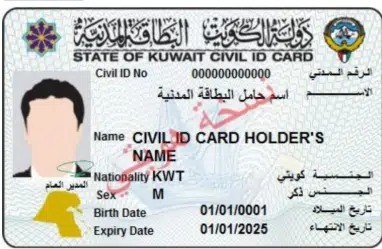
What Information is on Your Civil ID?
- Full name
- Civil ID number
- Nationality
- Date of birth
- Expiry date
- Personal photo
Step-by-Step Guide to Check Your Civil ID Name Online
Here’s a detailed guide to check your Civil ID name using the Kuwait Mobile ID App:
Step 1: Install the App
Download the Kuwait Mobile ID App from the official app stores. Make sure it’s the latest version for full functionality.

Step 2: Register/Login
Use your Civil ID number and follow the on-screen instructions carefully.

- State your Civil ID No and passport number when not Kuwaiti.

Step 3: Verify Your Identity
An OTP will be sent to your registered mobile number. Enter it to confirm that you are who you are.

Step 4: Access Civil ID Details
Open the Civil ID section in the app. Here you can see:
- Your full legal name
- Civil ID number
- Expiry date
- The other personal information and nationality.

Step 5: Check for Errors
Compare the name displayed with your official documents. Ensure that there is spelling and order.
Step 6: Report Mistakes
In case of any error committed, you may go to the Ministry of Interior (MOI) or go to any of the registered service points and ask for the error to be corrected.
Read Also: Kuwait Family Visa 2026: Requirements, Fees & Status Check
Tips for Accurate Civil ID Information
- Make sure that your name does not differ from your passport and other documents.
- Always ensure that your Civil ID is accurate.
- Amend your Civil ID immediately in case of any change of name or other information.
- Always update your Mobile ID app to enjoy the services.
Common Errors

1. Name Spelling Mistakes
Error: You are not using your civil ID name, your passport, or other official documents. This is likely to occur because of a typo or poor transliteration of Arabic to English language.
Solution:
- Immediately inform the Ministry of Interior (MOI) through the app or by visiting an MOI service center about the error.
- Also, bring along supporting documents such as a passport, a birth certificate, or an old Civil ID.
2. Wrong Order of Names
Mistake: The first name, middle name, or surname is incorrectly placed on the Civil ID. This may result in disagreements with bank accounts or visa applications.
Solution:
- Check your legal papers to the latter to ensure the proper order.
- Submit a correction request at an MOI center or through the Mobile ID App support section.
3. Missing Name Components
Error: Sometimes, a part of your name (middle name or family name) is missing in the Civil ID record.
Solution:
- Visit the nearest MOI service center with valid identification documents.
- Demand a complete update of your Civil ID information.
4. Mobile Number Not Registered
Mistake: In case your mobile number is not connected properly, you may not get the OTPs or verification codes in the application.
Solution:
- Re-register your mobile number at any of the authorized service centers at the MOI.
- Use the personal number that is entered in your Civil ID record to eliminate the OTP problem.
5. Expired Civil ID
Error: Your civil ID is out of date, and thus, you are unable to check your name and other information online.
Solution:
- Renew your Civil ID at an MOI center or via the Kuwait Mobile ID App (if renewal service is available).
Common Questions About Civil ID Name Check
How many days do you take to update Civil ID info?
At MOI centers, updates are normally done in a few days.
Is it possible to check expatriates’ Civil ID online?
No, the Kuwait Mobile ID App enables expatriates to check and verify the Civil ID information.
What am I supposed to do in case of the wrong name?
Call the MOI right away to make corrections so as not to have problems with the governmental services or legal paperwork.
Read Also: Kuwait Nursing License Status: What Each Result Means (2026)
Final Words
The Civil ID is the key to government services and legal transactions in Kuwait. With the Kuwait Mobile ID App, it is quite quick, secure, and reliable to check your Civil ID name.
Do not wait until it occurs. Never miss a check of your Civil ID name and make sure the information is correct. It is fast, simple, and will save you much time and inconvenience in the future.